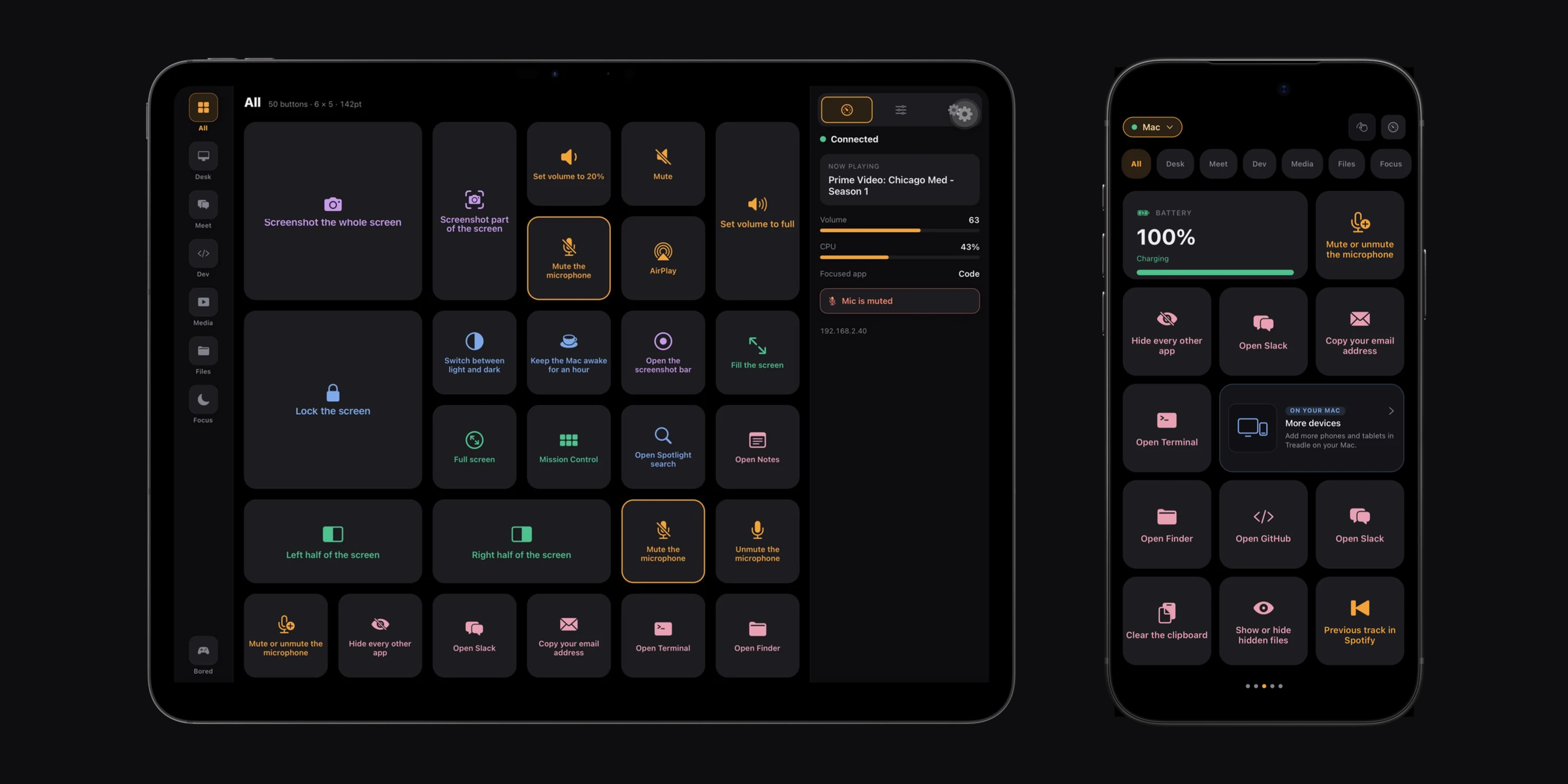
A Mac control panel
that lives on an iPad.
Tap a button on the iPad. The Mac does the work. No cloud, no account, no subscription.
Treadle turns an iPad or iPhone into a button panel for a Mac. It started as a personal tool: an iPad Pro on the desk, a MacBook Pro beside it, and a grid of buttons that fire actions over the local network.
In September we decided to sell it. That changed what every shortcut we had taken was worth. We built the Mac app, the iPad and iPhone app, the licence service, and the website. First commit on 19 September 2026. Live on 15 November.
Six things that shaped the work.
- 01
One developer
Every choice had to be something one person could build, support, and still understand in three years.
- 02
Local only
Plain HTTP and a WebSocket on the home network. No cloud, no account, no telemetry. That is the main promise, so it also limits what we can measure.
- 03
No Mac App Store
A sandboxed app can only run binaries inside its own bundle. Treadle calls out to tools like osascript and shortcuts, needs Accessibility, and sends Apple Events to apps the user picks. Any one of those rules it out.
- 04
Gatekeeper
macOS Sequoia removed the Control-click override. An unsigned download sends people into System Settings. For a consumer app, that is a dead end.
- 05
No haptics on the iPad
The iPad Pro we tested on has no Taptic Engine, so press feedback is visual. On iPhone, buttons with a hold action get a short vibration.
- 06
Useless on its own
The iPad app does nothing without the Mac app. App Review has to understand that, and so does a stranger who installs it.
What we chose, and what it cost.
- 01
The iPad sends an ID, never a command
The Mac maps each action ID to a fixed command in an allowlist and runs it with execFile. Nothing from the iPad reaches a shell. Every route needs a bearer token, and the engine refuses to start if a button points at an ID with no allowlist entry.
COSTEvery new kind of action needs code or a macOS Shortcut. Custom commands can only be entered on the Mac.
- 02
Two channels, not one
Presses go over HTTP. State comes back over a WebSocket. A slow state query, like asking an app what is playing, can never hold up a press.
COSTTwo connections to keep honest.
- 03
The engine runs inside the signed app
The first version ran Node directly from launchd. macOS permissions attach to the binary, so a Node upgrade orphaned Accessibility and Screen Recording approvals, and a missing approval looked like success. Now the Mac app registers with SMAppService and starts the engine itself, so permissions survive updates.
COSTThe embedded Node has to be signed and notarised with the rest.
- 04
Direct download, merchant of record
The Mac app ships as a notarised, stapled DMG with Sparkle updates. Paddle takes payment and handles tax. We picked it over Lemon Squeezy for continuity: it is independent and built for software.
COSTAbout 5% plus 50 cents a sale, and checkout needs JavaScript. We confined that script to one route so every other page works without it.
- 05
The licence service is never on the runtime path
At purchase, the service signs a licence file with an Ed25519 key. The app checks it offline against a public key built into the app. If the service is down for a week, new purchases wait and every installed copy keeps working.
COSTNo instant kill switch. A revoked licence stops at its next activation check.
- 06
A free tier that is a real product
The starter deck plus one of your own, every built-in action, and Shortcuts. The paid version adds automation. People pay for time saved, not cosmetics. $29 CAD once with two years of updates, or a $39 lifetime licence for the first 300 buyers.
COSTLess revenue per user. A free tier that reads as a demo costs more.
- 07
No analytics on the website
The pitch is privacy. A tracker on the marketing site would undercut it.
COSTTraffic is measured from server logs, which is slower and cruder.
Process that held up.
- 01
A plan, a prompt, and a review per phase
Every phase had acceptance criteria, ground rules, and a written review before it merged. When a phase fell short, the review said so.
- 02
A forced checkpoint
The plan said to stop after the third milestone and test the panel on the real iPad before building the config system and state channel on top. Problems found there were still cheap to fix.
- 03
Config as data
Buttons live in one validated file. Adding one means editing that file, with no rebuild of the iPad app. The Mac editor later wrote the same JSON.
- 04
Tests at every layer
Shared code, the engine, the panel, and the Mac app each have their own automated suite.
- 05
Decisions written down as they were made
When a decision was reversed, the reversal went in the same file with the reason. That made the rename and the dropped waitlist cheap.
Three things we got wrong.
- 01
The gesture pad
A 3×3 tile where you draw shapes to trigger actions, with shapes recorded on the Mac trackpad. On a real iPad it failed: a tile sharing touches with a scrolling grid, a recorder on a different surface from the matcher, and an encoder that dropped fields it didn’t know. We replaced it within days with a full-screen Gestures screen that records and matches on the same device. Record where you match.
- 02
The waitlist
We planned a pre-launch email waitlist and a gated download, because the Mac app is useless without the unreleased iPad app. The same day we decided to launch only when both apps were ready, which removed the reason for it. We dropped it.
- 03
The name and the domain
The working name, LaunchPad, is a feature built into every Mac, so it could never rank. We renamed to Treadle and carried it through the repo, every string, and the bundle IDs. treadle.ca was taken. gettreadle.com was free on 29 September and gone by 2 October. We landed on gettreadle.ca. Next time, register the domain the day you pick the name.
Two apps, two channels, one licence service.
We wrote the plan before the code. Each phase had acceptance criteria, ground rules, and a review written before it merged. The decisions here were ours, made by reading what each phase produced and choosing between the options. What software can’t check on its own, like how a held button feels under a finger, went on a hardware checklist that had to clear before launch.
- 01
Mac app
Native Swift menu-bar app. Deck editor, permissions, licence, and the embedded Node engine that runs every action.
- 02
Panel
One universal Expo app for iPad and iPhone. Finds the Mac over Bonjour, pairs with a six-digit code, renders decks.
- 03
Action channel
POST /api/action/:id over HTTP. An ID in, a fixed argv out. Nothing else rides on it.
- 04
State channel
A WebSocket pushes what the Mac knows: now playing, volume, mic, battery, focused app.
- 05
Licence service
A small NestJS service. Signs licence files at purchase. Never on the runtime path.
What powers it.
- Swift · SwiftUI
- Mac app, editor, menu bar
- Node · Hono
- Embedded engine, action registry
- TypeScript · zod
- Shared schema across engine and panel
- Expo · React Native
- Universal iPad and iPhone panel
- Skia
- Gestures and games on the panel
- Bonjour
- Zero-config discovery on the LAN
- NestJS · Postgres
- Licence service on Railway
- Next.js
- Static-export site at gettreadle.ca
- Sparkle
- Signed Mac updates
- Paddle
- Merchant of record, CAD pricing